Why Solovista Signature Script is Your Next Favorite Design Asset
When you’re building a brand, a website, or a piece of marketing collateral, the font you choose does more than just display words. It sets a tone. It creates a feeling. I’ve spent years watching projects transform from flat, forgettable layouts into memorable brand identities, and it often comes down to that one element that ties everything together: the typeface. While serif fonts convey tradition and sans serif fonts scream efficiency, script fonts are the secret weapon for adding humanity and flair. That is exactly why I want to talk about a specific premium font that has been catching my eye recently: Solovista Signature Script.
If you are a designer, a small business owner, or a content creator looking for a creative font that balances elegance with approachability, this typeface deserves a spot in your toolkit. It isn’t just another handwritten font; it is a carefully crafted tool designed to enhance your visual storytelling. Let’s break down what makes this font work and, more importantly, how you can use it effectively in your next project.
The Anatomy of a Modern Script Font
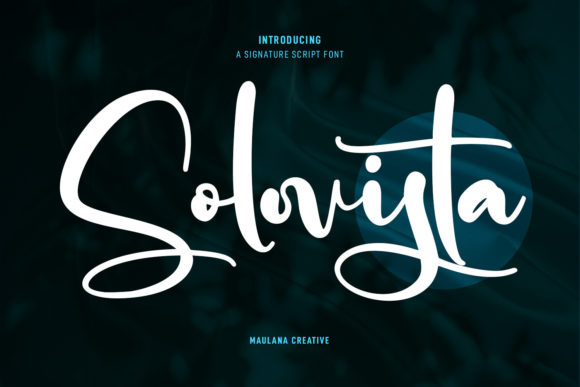
First, let’s look at what we are working with. Solovista Signature Script is defined by its regular contrast strokes. In modern typography, contrast refers to the variation in thickness between the thick and thin parts of a letter. Because Solovista maintains a steady, regular contrast, it avoids looking too "bushy" or aggressive. Instead, it offers a smooth, flowing rhythm that mimics natural handwriting without sacrificing readability.
One of the standout features here is the inclusion of ligatures and alternates. If you have ever used a script font where two letters collided awkwardly, you know how frustrating that can be. Good typography requires flow. Solovista solves this by offering fun characters and alternates that allow you to customize the look of specific letters. This means you can swap out a standard "t" for something with a longer tail or connect an "o" and an "n" in a way that looks genuinely hand-lettered. This attention to detail is what separates a standard display font from a versatile design asset.
Strategic Applications: Where to Use Solovista
Knowing a font looks good is one thing; knowing where to put it is another. Because of its unique personality, Solovista Signature Script works exceptionally well in specific scenarios. It is not meant for body text (please don't use script fonts for long paragraphs!), but it shines as a hero element.
Brand Identity and Logo Design
For logo design, you need a typeface that creates instant recognition. Solovista offers a distinct signature style that feels personal and authentic. If you are a boutique owner, a photographer, or a lifestyle blogger, this font can anchor your brand identity. It suggests that there is a real person behind the business—someone who cares about the details. I recently saw a skincare brand use a similar style to replace their generic sans serif, and the immediate shift in brand perception was noticeable; it looked more luxurious and bespoke.
Digital Media and Web Design
In web design and social media graphics, grabbing attention in the first second is crucial. Solovista works beautifully for hero headers on websites or as overlay text on Instagram posts. Its modern appeal bridges the gap between professional and casual, making it perfect for entrepreneurs who want to look established but still relatable. However, a practical tip: ensure there is enough contrast between the font color and the background to maintain that readability we talked about earlier.
Publishing and Editorial Design
If you are in the business of editorial design—think magazines, newsletters, or book covers—Solovista is a fantastic choice for pull quotes, chapter titles, or feature headlines. It breaks up the monotony of standard serif and sans serif body copy, guiding the reader’s eye to the most important parts of the page. It adds a layer of sophistication to packaging design as well, particularly for product labels that need to convey artisanal quality.
Mastering Font Pairing and Visual Hierarchy
Using a script font effectively requires restraint and strategy. You cannot simply drop Solovista Signature Script onto a page and expect it to work miracles. The key to success lies in font pairing and visual hierarchy.
The Rule of Contrast
Because Solovista is a display font with a handwritten personality, it needs to be paired with something grounded and simple. If you pair it with another decorative font, the result will be chaotic and unreadable. The best practice is to pair it with a clean, geometric sans serif font or a sturdy, traditional serif font.
For example, imagine a wedding invitation. You might use Solovista for the names of the couple to add romance and flair. For the date, time, and location details, you would use a clean sans serif. This creates a clear hierarchy: the script draws the eye to the "who," while the sans serif informs the "where" and "when" with maximum clarity.
Evaluating Project Fit
Before you commit to using this typeface, ask yourself: does the personality of Solovista match the personality of my audience? Because it features "fun characters" and a modern vibe, it is excellent for markets targeting millennials or Gen Z, creative industries, fashion, and food. It might feel out of place, however, in highly corporate environments like law firms or heavy industrial manufacturing, where trust is built on rigid stability rather than creative expression.
Practical Guidance for Implementation
When you are ready to integrate this commercial font into your workflow, keep these practical considerations in mind to ensure your project looks professional.
- Check the Licensing: Always review the commercial font license before using it in client work. Ensure the license covers the usage you intend (e.g., print, digital, merchandise). This protects you legally and supports the type designers who create these design assets.
- Explore the Alternates: Don't just type and go. Open your design software (like Adobe Illustrator or Photoshop) and explore the Glyphs panel. Since Solovista includes ligatures and alternates, manually adjusting specific letter combinations can take your design from "good" to "custom."
- Test for Readability: Always do the squint test. If you step back from your screen and squint, can you still read the headline? If the letters blur into a blob, you may need to increase the font size or the tracking (spacing between letters).
- Color and Texture: Script fonts like this often look best when they aren't stark black on white. Try using soft greys, off-whites, or brand colors. Adding a slight texture overlay can also enhance the handwritten feel of the typeface.
Ultimately, Solovista Signature Script is more than just a pretty face. It is a functional, versatile tool for anyone looking to inject personality into their work. Whether you are crafting a new logo, designing a website header, or creating a social media campaign, this font has the potential to bridge the gap between your message and your audience. It reminds us that in a digital world, a little bit of human touch goes a long way.